One month into the new place and getting everything back to where it was before had been a mission. With the likely short time here, a lot of projects are a bit lacking in purpose so anything thats being done is limited to things which will move with me to the next house.
While I get round to starting the various ones I can do, I'll post ones from the last place which were at least useful in some way and will probably be repeated when i move somewhere more long term.
The biggest of these will likely be the Camera Jib (from waaaay back), the Golf and some stuff on the desk. There'll probably be more when i remember things I need to do.
But first, flash backs!
Showing posts with label desk. Show all posts
Showing posts with label desk. Show all posts
Wednesday, 8 October 2014

Sunday, 26 January 2014
The Big Desk Move - Pt 9: Odds and Ends
By this point the desk has been done for quite some time, (nearly 2 months) but a few things crop up now and again which work quite well and are worth documenting, if only trivially.
My headphones have NEVER had a decent home. I've tried lots of things and never know what to do with them.
So far int he last few years I've tried:


So far it seems to be a lot better than anything I've done before. I'll probably give it a coat of black paint and some varnish too just so it doesn't look glaringly different to everything else which is either Birch or black currently.
My headphones have NEVER had a decent home. I've tried lots of things and never know what to do with them.
So far int he last few years I've tried:
- Hung them by an ear cup off the front of the desk (which just gets hit by the chair and usually leaves a mark on the desk from the cup fabric)
- Under the screen (usually end sin tangled wires with the mouse and keyboard)
- Left them to the side of the mouse/keyboard (now the laptop is there, so no good. Plus it always tangled.)
- Hung them over the screen itself (obscures part of the screen)


Nothing works
I found a metal hook i'd made from some 1/2" x 16 ga. aluminium bar before I got the other hooks which now hold up the laptop PSU. This used to be under the desk and was a bit shabby, but with some extra time with the pliers its turned into a reasonable point to hang the headphones from.

For the time being I've just clamped it in place to see how useful they are in this position. If they get tangled like before I may move it again, but until that happens screwing it into the nice TV mount and leaving a hole if I move it later isn't on the cards.

So far it seems to be a lot better than anything I've done before. I'll probably give it a coat of black paint and some varnish too just so it doesn't look glaringly different to everything else which is either Birch or black currently.
Thursday, 12 September 2013
The Big Desk Move - Pt 8: Hanging around.
Now that a few things are finding homes on the desk there are a few unforseen improvements which need to be made.
One of them is the laptop and it's power brick. Until now i've just moved the laptop around wherever there was space, but now that it has an hdmi hookup to the TV and a wired ethernet plug it can have a specific home to the right of my mouse (I don't know why, but having it on the left never felt comfortable).

The problem with this is mostly the power brick dangling down behind my tower and one of the 6 ways attached to the legs, which the brick isn't even using. This means the brick either gets lost behind the back and isn't that easy to extract, or it sits on the desk and will inevitably get tangled in my headphones (which will be in the odds-and-ends post later).
The 240V supply in comes across the underside of the desk above my legs and then goes to the right most screen pillar. Thanks to a spare clover-leaf power cable this one car be left there and the brick attached when needed. But it still doesn't help with the brick being in the way, or worst of all, falling off the desk and yanking the cable if not hitting something else under the desk.

In the previous incarnation of this desk there were some metal hooks from $DIY_Store which held the network cables, some power cables and USB cables up and out of the way of my feet. With a new, more organised layout of the cables, these were redundant, till now.

Two of the hooks attached onto the underside of the desk at the back fit the brick almost perfectly, its not quite flat, but its enough that its out of the way.

And better yet, it cant actually be seen from above, but it's still within easy reach when the time comes to disconnect it.
Annoyingly it actually took longer to find 4 screws which were short enough to not pop through the top of the desk and find the hooks, which i'd put somewhere foolish (under the bed in a box, instead of in the misc bracket box in the DIY cupboard) than it did to fit them.
Monday, 2 September 2013
The Big Desk Move - Pt 7: Putting Your Feet Up
One of the final pieces the desk requires is something it rest my feet on. Previously, I used an old box I made for storing drives, but after a lot of use, it's pretty much dead.
The new one will sit over the top of the sub, ideally this means it wont get quite as beaten up as the previous one did (before i used the box).
Fortunately theres a good deal of spare plywood from modifying the desk. A few cuts later the top is ready

I was pretty sure i took a picture of the legs before they went on, but apparently not. I'm sure you can probably picture three pieces of wood in a pile, not too dissimilar from the one above.
Either way, here it is screwed together, next to an empty crate of Warsteiner.

It fits! The sub sit nicely underneath and I can prop my feet up and not tip the sub over when I move. Success!

There's another one which needs to be made for Sue, but that needs storage for things. it'll probably take some time and planning rather than a rather simple thrown together affair like this.
This is actually getting really near to the end of this project with smaller and smaller things being done. I'll probably save a few up for later and post them in a larger multi-point post. For now, just one more to go.
Wednesday, 28 August 2013
The Big Desk Move - Pt 5: Networking
At this point, the desk pretty much works, although the equipment leaves a little to be desired. With the racks moved into place (details to come) the internet is working again, but not to the PCs.
The last desk had a wall box underneath with a string of 4 cables coming out going to a panel, oneby one they'd developed faults and no amount of debugging had found a solid cause other than "it's dodgy".
So with a new build comes some new sockets and cables.

After about 2 hours patching, wrapping and feeding, then finally zip tying along the length, the rack's umbilical cord is coming together.

Finally, patch the other end into the comms rack, and it's done.

This is a bit of a short one and the comms rack got another overhaul too which i'll post shortly to make up for the lack of much happening.
Friday, 16 August 2013
The Big Desk Move - Pt4: How to Wall Mount a TV Without Using the Wall
One of the problems with moving everything into one room is displacing what was there before. Previously where the right end of the desk is was a chest of drawers with a TV on to watch in bed.
So now with the desk there the TV has to be re-mounted to continue this and watch things form the PC in bed too. The problem with living in a rental is while you can get away with a great deal if the landlords are nice, you can't always do major drilling into walls, nor is it wise to ask when they have already said yes to so much.
Enter a new idea, The Giant Bit Of Wood.

The wood fits down the back of the desk and is wedged between the leg underneath and the skirting board to stop it sliding out underneath, against the desk at the middle and then at the top to stop it going backwards to the wall.

Due to the sockets on the back clearance for plugs was questionable, so a space was fitted to the wood where needed.

Not taking any chances, the spacer is screwed to the wood perhaps a few too many times.

The bracket is then bolted through and the studs cut to length with a dremel.

Back in place the hole for the cables to enter without being seen is visible as well as the bracket.

Underneath the desk the upright is attached with a couple of small angle brackets to stop it falling away and leaving a gap. This together with the base being wedged holds it pretty well with little sway.


Next job, mount the TV, over a desk allowing for almost no visibility of where the brackets line up or where the screw holes go. Simples!

I'll leave the finished shots to the end once everything is setup and crucially, neat.
Monday, 12 August 2013
The Big Desk Move - Pt3: Loading the Screen Arm
With the arm rebuilt and temporarily clamped to the desk front the cables were rewired as mentioned before. Compared to the previous post, this is SO much better.

The cables flow and emerge from the bundles much nicer and still allow easy removal when the screens come off.
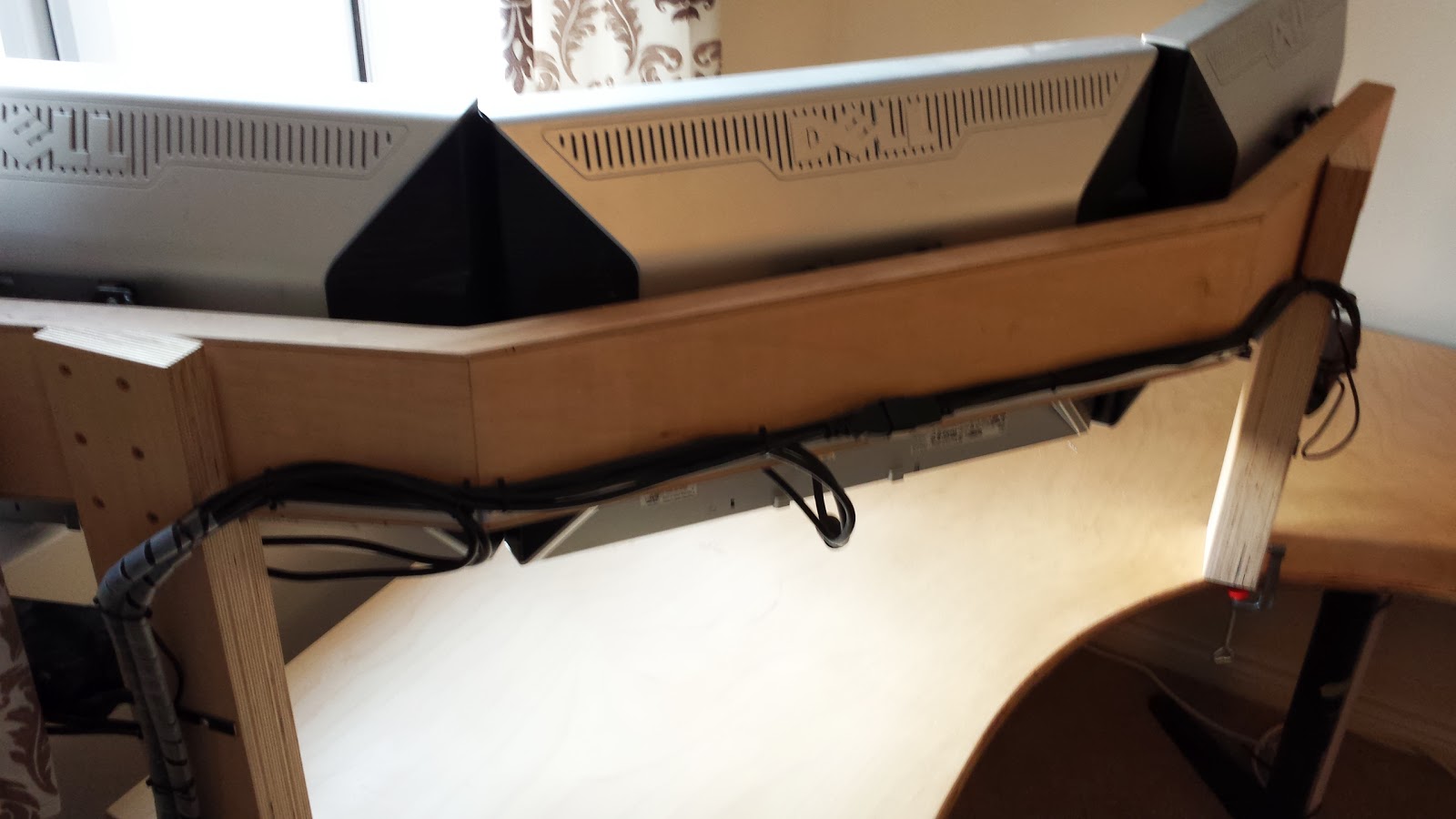
With the arm moved with a little help the final result is a completely cable free view and the cleanest the desk will ever be.

Just as I promised, clutter.

But at least with the screens setup after nearly 2 days of work (although some of those days were spent out and about with parents) I have a PC once again. Although theres no internet to use it with yet, that comes next.
Monday, 5 August 2013
The Big Desk Move - Pt 2: Screens
A while back I got sick of the screens being on their stands taking up a load of space on the desk itself and started making a single arm to hold them, and my speakers up out of the way.

The construction is two pieces of 18mm plywood to form the beam, with 3mm plywood on top and bottom to hide the grain and to hopefully prevent anything getting into the laminate. The posts are three layers of 18mm Birch plywood to match the desk with a shoulder cut into it to hold the beam.

Across the back is a mess of wires help in place wherever they fell in bunches using sticky hooks. It worked ok, but far from perfect.

New plan! A piece of scrap angle iron drilled and bent to fit around the base would hold the cables out of the way of the desk and make them neater and easier to work on if needed.

I ended up putting the support on the other way up to lift the cables a bit higher and avoid fouling the windowsill.

This makes it much neater overall, and while I was at it, I swapped the cable for the left most screen from VGA+extension to a single HDMI cable with some adapters to DVI. Much better picture and it leaves the left screen VGA available for the rack should it need it.
Monday, 29 July 2013
The Big Desk Move - Pt1: Pack Down and Move Out!
As Jonnie is moving in with me, I have to move all my computer stuff from the second bedroom in order for him to have space for a few bits and pieces, like a bed. And maybe some clothes? (please god let there be clothes).
So the way my desk is currently:
I'm by the window and the server rack (yes, I have a server rack, and a comms rack, but more on those later). Its usually pretty cluttered but when its not, it looks...

...like this! I'll come onto the TFT Rail later as its due an update.

To the right is a big extension for my girlfriends PC and enough space to work easily between or have up to a 4 person LAN.

Without the desk, the rooms seems pretty huge.

In the new room (yes, it looks incredibly similar, every room is Crown Magenta walls and beige carpet) the desk fits pretty well, but the space is narrower so the left edge of the desk has to be shortened to fit the rack (which is also moving with the PCs)

One makeshift work bench later and its cut to size.

The legs are a mix of heavy duty desk legs I got from another friend sometime ago and Ikea's finest grey table leg. Unfortunately for a comfortable height for the desk, the Ikea legs need to be raised a little with some blocks.

Cue the better part of an hour trying to get all the adjustable legs o match those of the Ikea ones.

The extension was also cut down but still leaves a sizable gap to work between our machines when needed.
There's a lot more work to this yet so i'll do another update in due course.
Subscribe to:
Posts (Atom)